 NovaPlay Arcade
NovaPlay Arcade
NovaPlay Arcade
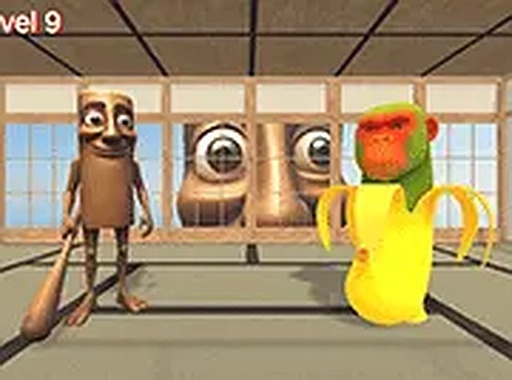
Meme Clicker Challenge Arcade delivers a lighthearted and engaging clicking experience. The meme-themed opponents add humor and variety, while the simple controls make it easy to pick up. The game is free, runs smoothly in a browser, and offers multiple levels with unique patterns. It is perfect for casual players looking for a quick, entertaining challenge without downloads or complex mechanics.
Meme Clicker Challenge Arcade is a lighthearted clicking game that draws inspiration from internet meme culture. Players face off against a series of quirky, meme-inspired opponents in fast-paced rounds. The core objective is to outlast each challenger by clicking strategically, testing both your reaction time and clicking speed. This free browser game is designed for desktop play and offers a smooth experience with keyboard or mouse controls. Full screen mode is available for an immersive experience, making it a perfect choice for casual players looking for a quick, entertaining challenge. The game features a humorous theme that adds a fun twist to the classic clicker genre.
To play Meme Clicker Challenge Arcade, use your mouse or keyboard to click on challengers as they appear on screen. Each round introduces a new meme character with unique patterns and behaviors. Your goal is to click quickly and accurately to defeat them and advance to the next level. The game tests your reaction time and clicking speed, so staying focused is key. Controls are simple, making it easy for anyone to jump in and start playing immediately. You can enable full screen mode for better visibility during gameplay.
This game features a humorous meme theme with a variety of internet-inspired characters. It offers simple clicking mechanics that are easy to learn but challenging to master. The game is free to play and runs directly in your browser, requiring no downloads or installations. It supports full screen mode for an immersive experience and is optimized for desktop play with mouse or keyboard controls. The game includes multiple levels, each presenting a new challenger with unique patterns to keep the gameplay fresh and engaging.
To succeed in Meme Clicker Challenge Arcade, focus on improving your clicking speed and accuracy. Practice regularly to get familiar with the patterns of each meme challenger. Stay calm and maintain a steady rhythm, as panicking can lead to missed clicks. Using full screen mode can help you see challengers more clearly, giving you a better reaction time. Finally, take short breaks between rounds to keep your reflexes sharp and avoid fatigue.



Player Comments
Sign in to comment
You must be logged in before posting a review or rating.
No account? Create one
No comments yet. Be the first to comment!