Intune Rally Rhythm Game
Reviews
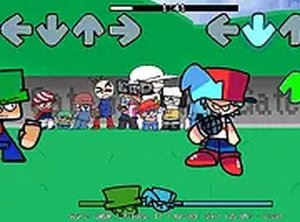
💡FNF: Intune Rally (Dave and Bambi) delivers a solid rhythm game experience with five original tracks. The controls are responsive, and each song has a unique beat that requires practice to master. The game runs smoothly in a browser with no lag. It offers good replay value for fans who enjoy improving their accuracy. The family-friendly design makes it suitable for all ages. A straightforward and enjoyable mod for rhythm game enthusiasts.
Description
Game Introduction
FNF: Intune Rally (Dave and Bambi) is a rhythm game mod that expands the classic Friday Night Funkin' experience. Players engage in musical duels, pressing notes in time with the beat to outshine their opponents. The game introduces five new songs, each with its own tempo and style, offering a fresh challenge for fans of the genre. It is designed to be family-friendly, focusing on timing and accuracy rather than violent or mature content. The game runs directly in your browser, making it easy to jump in without any downloads or installations.
How to Play
To play, use your keyboard arrow keys to match the notes scrolling on the screen. Each note must be pressed as it reaches the target area to keep the song playing and earn points. The game is optimized for desktop use, so a keyboard is recommended. You can adjust volume and settings from the menu. The goal is to complete each track without missing too many notes, building a streak to maximize your score. A full-screen option is available for a more focused experience.
Game Features
The game includes five new songs with distinct rhythms that challenge your timing. Simple arrow key controls make it easy to start playing immediately. A full-screen mode provides an immersive experience. The game is free and runs in any modern browser without requiring downloads or account creation. The content is family-friendly with no violence or inappropriate themes, making it suitable for players of all ages.
Tips for Success
Practice each song individually to learn its unique rhythm and note patterns. Start with slower songs to build your timing, then gradually take on faster tracks. Focus on accuracy over speed—missing fewer notes consistently will improve your overall score. Use the full-screen mode to minimize distractions. If you find a section difficult, try tapping your foot along with the beat to stay in sync. Regular practice will help you master the timing and achieve higher scores.
✅ Compatibility & Testing
Faq
Is this game free to play?
Do I need to download anything to play?
What devices are supported?
Can I play with friends or other players online?
How long does it take to complete all songs?
Are there different difficulty levels?
Other Similar Games
Chilled Out Rhythm Arcade
Chilled Out Rhythm Arcade

FNF Rivals Rhythm Game
FNF Rivals Rhythm Game

Sprunki Red Music Mixing Game
Sprunki Red Music Mixing Game
FNF Shucks Rhythm Arcade
FNF Shucks Rhythm Arcade
Sprunki OneShot Rhythm Game
Sprunki OneShot Rhythm Game
Night Escape Stealth Puzzle
Night Escape Stealth Puzzle
FNF Spaghetti Rhythm Game
FNF Spaghetti Rhythm Game
Bombardino Crocodilo Arcade Challenge
Bombardino Crocodilo Arcade Challenge