Tiny Blocks Color Match Puzzle
Reviews
💡Tiny Blocks delivers a satisfying puzzle experience that is easy to learn but hard to master. The color-matching gameplay is smooth, and the power-ups provide a nice boost when you group blocks effectively. The penalty for single-block collapses encourages careful planning, which increases replay value. It runs well on both mobile and desktop, and the full-screen mode is a nice touch. A great choice for casual gamers who enjoy thoughtful puzzles.
Description
Game Introduction
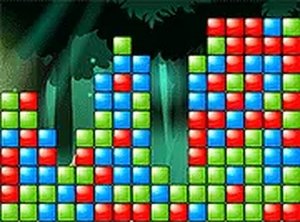
Tiny Blocks is a color-matching puzzle game that challenges you to collect blocks of the same color by touching or clicking them. The core mechanic is simple: larger groups trigger exciting power-ups like bombs or color clears, which help you progress through levels. But be careful—collapsing a single block costs 200 points. This balance of reward and risk makes every move strategic. Designed for all ages, the game offers a safe, family-friendly experience with vibrant visuals and intuitive controls. You can play directly in your browser without any downloads, and it supports full-screen mode for an immersive session. Whether on a mobile device or desktop, Tiny Blocks runs smoothly and is completely free to play. It is a great choice for casual gamers seeking a quick mental workout or a relaxing pastime.
How to Play
To play Tiny Blocks, simply tap or click on blocks that share the same color. Your goal is to collect as many same-color blocks as possible in a single move. Larger groups unlock special power-ups, such as bombs that clear a wide area or color clears that remove all blocks of a certain color. These power-ups make level progression more efficient and add variety to the gameplay. However, avoid collapsing a single block on its own, as this results in a 200-point penalty. Plan your moves carefully to maximize your score and unlock new challenges. The game runs in your browser, so no installation is needed. You can switch to full-screen mode for a more focused experience. Controls are responsive on both touchscreens and mice. Keep practicing to improve your strategy and achieve higher scores in this fun color-matching adventure.
Game Features
Color matching with simple tap or click controls. Power-ups including bombs and color clears that help you progress. A penalty system that deducts 200 points for single-block collapses. Free online play with no downloads required. Supports both mobile and desktop devices. Full-screen mode for an immersive experience. Vibrant visuals and intuitive interface suitable for all ages.
Tips for Success
To succeed in Tiny Blocks, focus on forming larger groups of same-colored blocks to trigger powerful boosts. Avoid tapping single blocks unless necessary, as each one costs 200 points. Take your time to scan the board before making a move, and plan ahead to chain combos. Regular practice will help you recognize patterns and improve your reaction time. Staying calm and patient is key to achieving high scores and progressing through levels.
Compatibility
Faq
Is Tiny Blocks free to play?
Can I play Tiny Blocks on my mobile device?
What happens if I accidentally tap a single block?
Does Tiny Blocks have different difficulty levels?
Can I play Tiny Blocks in full-screen mode?
Is Tiny Blocks suitable for children?
Other Similar Games
Hidden Object Puzzle Adventure
Hidden Object Puzzle Adventure
Christmas Gift Packing Puzzle
Christmas Gift Packing Puzzle
Color Sorting Puzzle Game
Color Sorting Puzzle Game
Happy Connect Puzzle Game
Happy Connect Puzzle Game
Block Blast Jewel Puzzle
Block Blast Jewel Puzzle

Polyshapes Shape Puzzle
Polyshapes Shape Puzzle
Bat Enchanter Witch Puzzle Game
Bat Enchanter Witch Puzzle Game
Solve the Square IQ Puzzle
Solve the Square IQ Puzzle