 NovaPlay Arcade
NovaPlay Arcade
NovaPlay Arcade
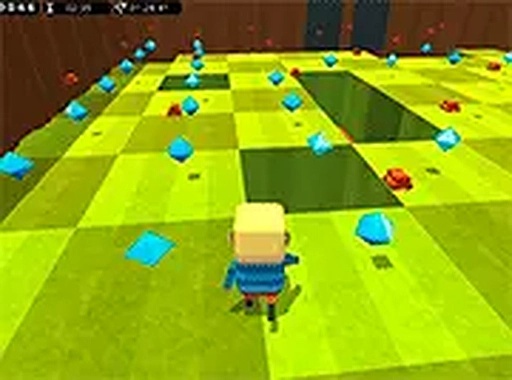
Kogama Grass Path Puzzle offers a refreshing mix of memory and strategy. The tile-guessing mechanic keeps each level engaging, and the upgrade shop adds meaningful progression. With two game modes and a family-friendly design, it is a solid choice for puzzle fans looking for a browser-based challenge.
Kogama Grass Path Puzzle is a browser-based puzzle adventure that challenges players to navigate through levels while collecting crystals and avoiding hidden traps. The core objective is to remember which tiles are safe and which cause falls, testing memory and careful observation. This game combines classic arcade-style movement with puzzle-solving elements, offering a unique twist where each step requires strategic thinking. Designed for desktop play, it provides a safe and engaging experience suitable for all ages. The grass theme adds a sense of mystery and decay, encouraging players to explore and learn from their mistakes.
Players control a character through each level using keyboard or mouse inputs on a desktop computer. The main goal is to collect all crystals scattered across the level while avoiding tiles that trigger falls. Observation and memory are key: players must guess which tiles are safe based on visual cues or trial and error. Successfully collecting all crystals allows progression to the next level. Points earned from crystals can be used in the in-game shop to purchase upgrades and abilities that aid in future levels. The gameplay emphasizes careful movement and learning from each attempt.
This puzzle game includes two distinct game modes, offering variety in how players approach the challenges. Crystal collection is the primary objective, with each crystal contributing to the player's score. Trap avoidance is a core mechanic, as many tiles are unsafe and can cause the character to fall. An upgrade shop allows players to spend earned points on abilities and enhancements that make subsequent levels easier. The tile-guessing challenge tests memory and pattern recognition, adding a layer of strategy beyond simple movement. These features combine to create a replayable experience that rewards careful planning.
Take your time to observe each tile before stepping on it, as rushing often leads to falling. Memorize the locations of safe tiles after each attempt to improve your route. Prioritize collecting all crystals in a level before moving on, as they provide points for upgrades. Use the shop wisely by purchasing abilities that match your playstyle, such as extra lives or speed boosts. Practice regularly to improve your memory and timing, as later levels may introduce more complex patterns. If you get stuck, try a different approach or revisit earlier levels to refine your skills.







Player Comments
Sign in to comment
You must be logged in before posting a review or rating.
No account? Create one
No comments yet. Be the first to comment!