Cube Runner WebGL Reflex Challenge
Reviews
💡Cube Runner WebGL Reflex Challenge offers a polished arcade experience that is easy to pick up but hard to put down. The WebGL graphics are smooth and responsive, making obstacle dodging feel satisfying. The increasing difficulty keeps you engaged, and the many levels provide good replay value. It is a great choice for anyone looking to sharpen their reflexes in a stress-free, family-friendly environment. Best of all, it runs instantly in your browser with no downloads.
Description
Game Introduction
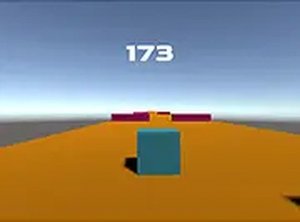
Cube Runner WebGL Reflex Challenge is a free online 3D arcade game designed to test your timing and precision. In this game, you control a cube as it moves through a series of levels, each filled with obstacles that you must avoid. The core objective is simple: navigate from the start to the end of each level without colliding with any obstacles. Success requires careful observation and quick reactions. The game uses WebGL technology to deliver smooth 3D graphics and responsive controls, creating an engaging experience that runs directly in your browser. There is no need to download or install anything. You can also play in full screen mode for a more immersive view. With many different levels, each featuring unique obstacle arrangements, the game offers fresh challenges every time you play. Whether you have a few minutes to spare or want to focus on improving your reflexes, Cube Runner WebGL Reflex Challenge provides a clean, straightforward, and enjoyable experience for players of all ages.
How to Play
To play Cube Runner WebGL Reflex Challenge, you control the cube using keyboard or mouse inputs. Typically, you can use the arrow keys or WASD to move the cube left, right, forward, or backward. The goal is to guide the cube through each level without touching any obstacles. If you hit an obstacle, the level restarts, so careful movement and good timing are essential. The game starts with simpler levels and gradually increases in difficulty, introducing more complex obstacle patterns. You can activate full screen mode by clicking the full screen button for a better view. The game is designed for desktop play and works best on computers. Take your time to learn the layout of each level, and enjoy the challenge of mastering all the stages.
Game Features
Cube Runner WebGL Reflex Challenge includes smooth 3D graphics powered by WebGL technology. It offers many levels with unique obstacle layouts that provide a fresh challenge each time. The game supports full screen mode for a more immersive experience. It is free to play and requires no downloads or installations, as it runs directly in your browser. The controls are responsive, allowing for precise movement. The game is designed for desktop computers and works best with a keyboard or mouse. These features combine to create a clean, accessible, and engaging arcade experience that focuses on skill and reflexes.
Tips for Success
To succeed in Cube Runner WebGL Reflex Challenge, practice regularly to improve your timing and reaction speed. Focus on learning the obstacle patterns in each level, as this will help you anticipate upcoming challenges. Stay calm and move deliberately rather than rushing. Using full screen mode can help you see obstacles more clearly. Finally, take short breaks if you feel frustrated, as a fresh mind often performs better.
Compatibility
Faq
Is Cube Runner WebGL Reflex Challenge available on mobile devices?
Can I save my progress in Cube Runner WebGL Reflex Challenge?
What happens if I hit an obstacle in Cube Runner WebGL Reflex Challenge?
Does Cube Runner WebGL Reflex Challenge have any sound effects or music?
How many levels are there in Cube Runner WebGL Reflex Challenge?
Is Cube Runner WebGL Reflex Challenge suitable for young children?
Other Similar Games

Desert Rivals Racing Challenge
Desert Rivals Racing Challenge
Space Precision Guardian - Arcade Flight Game
Space Precision Guardian - Arcade Flight Game

Spirit Chase Arcade Adventure
Spirit Chase Arcade Adventure

Panda Coloring Fun
Panda Coloring Fun

Monster Truck Driving Challenge
Monster Truck Driving Challenge
Fruit Dash Delight Arcade
Fruit Dash Delight Arcade
Precision Aim Arcade Challenge
Precision Aim Arcade Challenge
Taffy Runner Sweet Chase
Taffy Runner Sweet Chase