Minion Funkin Rhythm Arcade Game
Reviews
💡FNF: Minion Funkin' is a well-crafted rhythm game that stays true to the original FNF formula while adding a fun visual twist. The minion characters are cute and the music is upbeat, making each duel enjoyable. The difficulty curve is fair, with early songs being easy to learn and later tracks offering a satisfying challenge. Replay value comes from trying to perfect each song and beat your high score. The browser version runs smoothly and loads quickly. It is a solid choice for fans of rhythm games or anyone looking for a light, family-friendly arcade experience.
Description
Game Introduction
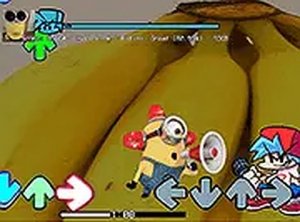
FNF: Minion Funkin' is a browser-based rhythm game that blends the core mechanics of a popular music-rhythm series with a lighthearted minion theme. Players take on the role of a character who must outperform a humorous minion rival in a musical duel. The game's objective is to press the correct arrow keys in time with the beat of each song, building up a high score and maintaining a full health bar. Its playful visuals and upbeat soundtrack create a family-friendly atmosphere suitable for quick sessions or extended play. Originally shared on a modding community platform, this version is optimized for desktop browsers and requires no downloads or registration, making it instantly accessible.
How to Play
To play, use your keyboard's arrow keys—up, down, left, and right—to match the arrows that appear on screen. Each successful press in sync with the music increases your score and keeps your health bar full. Missing notes reduces your health and may cause an early game over. You can navigate menus with your mouse to select songs and adjust settings. The game supports full-screen mode for a more immersive view. As you progress through the songs, the tempo increases, demanding more precise timing. The interface clearly displays your score, health, and combo count, helping you track your performance. If you fail a song, you can restart immediately without any penalty.
Game Features
Simple keyboard controls that are easy to learn and use. Multiple songs with increasing difficulty levels to provide a gradual challenge. Minion-themed visuals and music that create a humorous and lighthearted tone. Free browser-based gameplay with no downloads, registration, or payment required. Full-screen mode for an immersive experience. A clean interface that shows your score, health, and progress clearly. The game runs smoothly in modern web browsers and works best on a computer with a stable internet connection.
Tips for Success
Practice each song multiple times to become familiar with its rhythm and note patterns. Focus on maintaining a steady rhythm rather than trying to press keys as fast as possible. Pay attention to the visual cues on screen and try to anticipate upcoming arrows. Keep an eye on your health bar and adjust your timing if you start missing notes. Start with easier songs to build your skills before moving on to faster tracks. Take short breaks if you feel frustrated, as a fresh mind often improves accuracy.
Compatibility
Faq
Is this game free to play?
Can I play this game on my mobile phone or tablet?
Do I need to download any software or plugins?
What happens if I lose all my health during a song?
Are there different difficulty levels for the songs?
Can I change the game settings or controls?
Other Similar Games

Cannon Shots Bucket Puzzle
Cannon Shots Bucket Puzzle
Space Shooting 2D Arcade Game
Space Shooting 2D Arcade Game
Mining Simulator Arcade
Mining Simulator Arcade
Chu Choo Cake Puzzle Arcade
Chu Choo Cake Puzzle Arcade
Tripeaks Castle Solitaire Card Puzzle
Tripeaks Castle Solitaire Card Puzzle
Harvest Beans Arcade Game
Harvest Beans Arcade Game

Santa Weightlifter Balance Game
Santa Weightlifter Balance Game

Kids Sun Observation Puzzle
Kids Sun Observation Puzzle