 NovaPlay Arcade
NovaPlay Arcade
NovaPlay Arcade
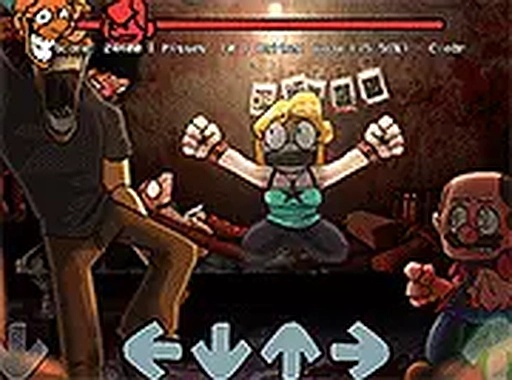
Shucks Rhythm Arcade delivers a polished rhythm experience with the catchy song Shucks. The colorful visuals and straightforward arrow-key controls make it accessible for all ages. It runs smoothly in a browser with no downloads, and the full-screen option enhances immersion. A great choice for casual players and rhythm fans alike.
Shucks Rhythm Arcade is a fan-made rhythm game inspired by the Friday Night Funkin' modding community. It features the song Shucks by Ezzythecat, originally part of a cancelled mod but now offered as a complete playable experience. Players take on the role of a character in a musical showdown, matching beats in a colorful, non-violent setting. The game is designed for quick, engaging sessions and runs entirely in a browser on desktop computers with no downloads required. It is a great choice for rhythm game fans who enjoy upbeat tunes and simple, engaging gameplay.
To play Shucks Rhythm Arcade, players use keyboard arrow keys to match on-screen prompts. The goal is to press the correct arrows in time with the music to score points and advance through the song. The game runs in a browser on desktop computers, so no downloads are needed. Players can switch to full screen mode for a more immersive experience. The key is to focus on the rhythm, follow the beat, and enjoy the playful musical showdown. Practice helps improve timing and coordination.
This game offers rhythm-based gameplay that tests timing and coordination. It is a fan-made mod featuring the song Shucks. The catchy music keeps players engaged. The game is free to play in a browser with no installation required. Full screen support is available for a better experience. The controls are simple, making it accessible for players of all skill levels. The non-violent, colorful setting makes it suitable for casual play.
To succeed in Shucks Rhythm Arcade, focus on the beat and try to anticipate the arrows. Start by playing at a slower pace to get used to the rhythm. Practice regularly to improve your timing and coordination. Use full screen mode to minimize distractions. Listen carefully to the music, as the prompts are synced with the song. If you miss a note, don't get discouraged—just keep going and try to stay in sync. Consistent practice is key to mastering the song.



Player Comments
Sign in to comment
You must be logged in before posting a review or rating.
No account? Create one
No comments yet. Be the first to comment!