Blue Red Puzzle Platformer
Reviews
💡Blue Red delivers a clean and addictive puzzle experience. The requirement to complete each level twice adds replay value and tests memory. Controls are responsive, and the difficulty ramps up smoothly. It is a solid choice for casual gamers who enjoy color-based challenges and want a free, family-friendly game.
Description
Game Introduction
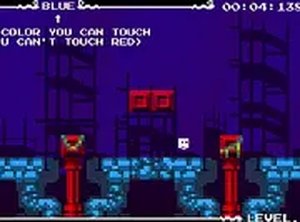
Blue Red Puzzle Platform Game Online is a free browser-based puzzle platformer that tests your reflexes and color recognition. In this game, you control a block that must navigate through levels filled with blue and red platforms. The core challenge is that your block can only safely step on blocks of a specific color—touching the wrong color ends the attempt. Each level must be completed twice, once for each color, to progress. This simple yet clever mechanic creates a fun and engaging experience that sharpens focus and timing.
How to Play
To play Blue Red, use your keyboard or mouse to move the block. On desktop, arrow keys or WASD allow you to navigate the block left, right, up, and down. The goal is to reach the exit portal without stepping on blocks of the forbidden color. Each level specifies which color is safe. Plan your route carefully and avoid traps. Complete the level once, then replay it with the other color to fully clear it. The game is free to play in your browser and supports full screen mode for a better view. Start with simple levels and progress to more complex challenges.
Game Features
Blue Red is free to play directly in your browser with no downloads or installations required. It offers full screen mode for an immersive experience. Keyboard and mouse controls provide flexible input options. The game is family-friendly and suitable for all ages. Levels gradually increase in difficulty, offering a steady challenge that keeps players engaged.
Tips for Success
To succeed in Blue Red, practice recognizing colors quickly and plan your path before moving. Take your time to observe the layout of each level, as rushing often leads to mistakes. Focus on memorizing safe routes for each color, since you will replay the same level twice. Stay calm and patient—precision is more important than speed. Regular practice will improve your reflexes and color recognition over time.
Compatibility
Faq
Is Blue Red available on mobile devices?
Do I need to create an account to play?
Are there any in-game purchases or ads?
Can I save my progress in Blue Red?
What happens if I touch the wrong color block?
Is there a time limit for completing each level?
Other Similar Games
Super Mega Memory Match Puzzle
Super Mega Memory Match Puzzle

Santa Drop Physics Puzzle
Santa Drop Physics Puzzle

Snake 2 Arcade Game
Snake 2 Arcade Game
Kogama Spooky Parkour Platformer
Kogama Spooky Parkour Platformer
Make the Cube 3D Puzzle
Make the Cube 3D Puzzle
Forest Fruit Match Puzzle Game
Forest Fruit Match Puzzle Game

Smileys Emotion Collection Puzzle
Smileys Emotion Collection Puzzle

Fling Knight Arcade Game
Fling Knight Arcade Game