Outer Reach A New Beginning Story
Reviews
💡Outer Reach A New Beginning delivers a well-paced interactive story where every decision feels impactful. The narrative is engaging without being complex, making it accessible for younger players. Replaying to see different outcomes adds good value. The game runs smoothly on both mobile and desktop, with no ads or distractions. It is a solid choice for a short, thoughtful gaming session.
Description
Game Introduction
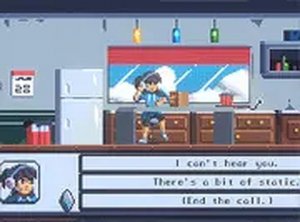
Outer Reach A New Beginning is an interactive story game where you step into the role of a young girl who discovers a box of her father's old inventions. As she examines these mysterious items, unexpected events begin to unfold. The core objective is to navigate the narrative through your choices, shaping the direction of the story. What makes this game unique is its focus on decision-driven storytelling, where every dialogue option and communication path you choose influences the outcome. It offers a family-friendly, safe experience suitable for players of all ages, with no violent or inappropriate content.
How to Play
Playing Outer Reach A New Beginning is simple and intuitive. You start the game and are presented with a story scenario involving the girl and her father's inventions. As the plot unfolds, you encounter dialogue options and multiple-choice questions. You select the response you think is best to progress the story. Each choice influences the narrative, leading to different outcomes and discoveries. The game is designed for all ages and can be played using a mouse on desktop or touch controls on mobile devices. For a more engaging experience, you can switch to full screen mode using the game's settings. You can explore different paths by replaying and making new choices to see all possible endings.
Game Features
The game features interactive dialogue choices that shape the story. It offers a family-friendly narrative suitable for all ages. The game is free to play in your browser with no downloads required. It supports both mobile and desktop devices. Full screen mode is available for a more immersive experience. The game runs smoothly in your browser and is designed for short or extended play sessions.
Tips for Success
To get the most out of Outer Reach A New Beginning, consider replaying the game to explore different dialogue options and see how each choice affects the story. Pay close attention to the narrative details, as small decisions may lead to surprising outcomes. Take your time when selecting responses, as there is no time limit. This approach helps you uncover all possible story paths and endings. Enjoy the experience at your own pace, and don't hesitate to try new choices on subsequent playthroughs.
Compatibility
Faq
Is Outer Reach A New Beginning free to play?
Can I play this game on my mobile phone?
Does the game have multiple endings?
Is there any violence or inappropriate content in the game?
Do I need to download anything to play Outer Reach A New Beginning?
Can I play the game in full screen mode?
Other Similar Games
Super Mega Memory Match Puzzle
Super Mega Memory Match Puzzle
Santa Drop Physics Puzzle
Santa Drop Physics Puzzle

Snake 2 Arcade Game
Snake 2 Arcade Game
Kogama Spooky Parkour Platformer
Kogama Spooky Parkour Platformer
Make the Cube 3D Puzzle
Make the Cube 3D Puzzle

Forest Fruit Match Puzzle Game
Forest Fruit Match Puzzle Game

Smileys Emotion Collection Puzzle
Smileys Emotion Collection Puzzle
Fling Knight Arcade Game
Fling Knight Arcade Game