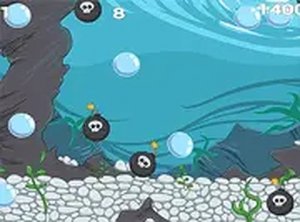
Bubblesly Arcade Skill Game
Reviews
💡Bubblesly delivers a straightforward score-chasing experience that is easy to pick up. The desktop controls are smooth, and the ability to replay levels for a better time adds lasting appeal. While the concept is simple, the focus on reaching 10,000 points keeps each session focused and rewarding. It is a solid choice for players who enjoy clear goals and friendly competition.
Description
Game Introduction
Bubblesly is a free online arcade game that challenges players to reach 10,000 points in each level to advance. Designed for desktop play, it offers responsive controls using a keyboard or mouse. The simple goal of scoring points keeps the gameplay focused and addictive, suitable for players of all ages. Once a level is completed, players can revisit it through the score menu to try for a higher score and a faster time, encouraging friendly competition when comparing results with friends. Bubblesly is part of a WebGL games collection that includes titles like Idle Forest Guardian and Mega City Racing, and can be played directly in a browser.
How to Play
To play Bubblesly, use your keyboard or mouse on a desktop computer. Your main objective is to score 10,000 points to advance to the next level. After finishing a level, you can go back through the score menu to replay and aim for a higher score. The game is straightforward: focus on achieving the target score efficiently. Compare your performance with friends to see who is faster. For the best experience, play on a computer and consider using full screen mode to immerse yourself fully in the gameplay.
Game Features
Bubblesly is free to play with no downloads required. It features desktop-optimized controls for smooth interaction. Full screen mode provides a more immersive experience. Level progression rewards consistent scoring, and the score comparison feature lets you challenge friends and track personal bests. The game is part of a WebGL collection, ensuring smooth browser-based performance.
Tips for Success
To succeed in Bubblesly, focus on consistent scoring to reach the 10,000-point target each level. Practice regularly to improve your speed and accuracy. Revisit completed levels to refine your technique and beat your previous scores. Compare your results with friends to stay motivated and discover new strategies. Playing in full screen mode can help you concentrate and reduce distractions.
Compatibility
Faq
Is Bubblesly available on mobile devices?
Do I need to create an account to play?
How many levels does Bubblesly have?
Can I play Bubblesly offline?
Is Bubblesly suitable for children?
How do I compare my score with friends?
Other Similar Games
Super Mega Memory Match Puzzle
Super Mega Memory Match Puzzle

Santa Drop Physics Puzzle
Santa Drop Physics Puzzle

Snake 2 Arcade Game
Snake 2 Arcade Game
Kogama Spooky Parkour Platformer
Kogama Spooky Parkour Platformer
Make the Cube 3D Puzzle
Make the Cube 3D Puzzle
Forest Fruit Match Puzzle Game
Forest Fruit Match Puzzle Game

Smileys Emotion Collection Puzzle
Smileys Emotion Collection Puzzle
Fling Knight Arcade Game
Fling Knight Arcade Game